PRSS runs on Apple silicon and Intel Macs. Installing is the usual drag-to-Applications routine.
1. Open the disk image
Open PRSS-darwin.dmg.

2. Drag PRSS to Applications
A window opens with the PRSS icon. Drag it onto the Applications folder beside it.

3. Open it
PRSS is now in Launchpad and Spotlight like any other app.

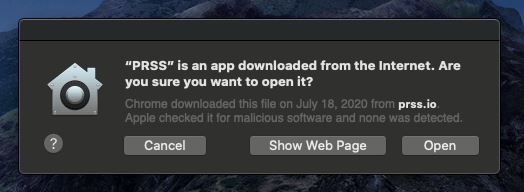
4. If macOS asks
Builds downloaded outside the Mac App Store may prompt on first launch. Choose Open — PRSS releases are built from trusted open source components.
That is the whole setup. Send feedback any time through About & Help in the PRSS sidebar.
Prefer the Mac App Store? PRSS is there too, and it updates itself.